The post Chainable external javascript file loading appeared first on webtoolkit.info.
]]>In this way you will form some sort of chainable javascript library loading, which will guarantee you that every file will be loaded only then when it has its dependencies loaded.
Usage
This example shows how to load jQuery library and only when its fully loaded then load jQuery UI library, and only then your scripts – “your-script.js”.
Source of the library
/**
*
*  Chainable external javascript file loading
*  http://www.webtoolkit.info/
*
**/
scriptLoader.load([
'http://ajax.googleapis.com/ajax/libs/jquery/1.3.2/jquery.min.js',
'http://ajax.googleapis.com/ajax/libs/jqueryui/1.7.2/jquery-ui.min.js'
'/javascript/feed/your_script.js'
]);


var scriptLoader = {
	_loadScript: function (url, callback) {
		var head = document.getElementsByTagName('head')[0];
		var script = document.createElement('script');
		script.type = 'text/javascript';
		script.src = url;
		if (callback) {
			script.onreadystatechange = function () {
				if (this.readyState == 'loaded') callback();
			}
			script.onload = callback;
		}
		head.appendChild(script);
	},

	load: function (items, iteration) {
		if (!iteration) iteration = 0;
		if (items[iteration]) {
			scriptLoader._loadScript(
				items[iteration],
				function () {
					scriptLoader.load(items, iteration+1);
				}
			)
		}
	}
}
The post Chainable external javascript file loading appeared first on webtoolkit.info.
]]>The post Javascript color conversion appeared first on webtoolkit.info.
]]>It supports RGB, HSV, CMYK color encoding systems.
First you need to create color object you want to convert from.
As mentioned above there are 3 types:
var obj = new RGB(10 /* red */, 20 /* green */, 30 /* blue */);
var obj = new HSV(10 /* hue */, 20 /* saturation */, 30 /* value */);
var obj = new CMYK(10 /* cyan */, 20 /* magenta */, 30 /* yellow */, 40 /* key black */);
Usage
Then you just need to pass that object to appropriate “ColorConverter” method.
To convert from HSV to RGB use library like this:
var result = ColorConverter.toRGB(new HSV(10, 20, 30));
alert("RGB:" + result.r + ":" + result.g + ":" + result.b);
Result: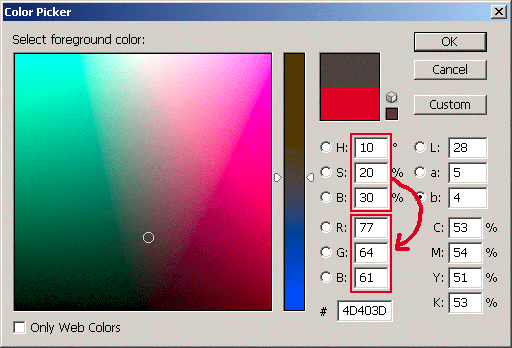
To convert from RGB to HSV use library like this:
var result = ColorConverter.toHSV(new RGB(10, 20, 30));
alert("HSV:" + result.h + ":" + result.s + ":" + result.v);
Result: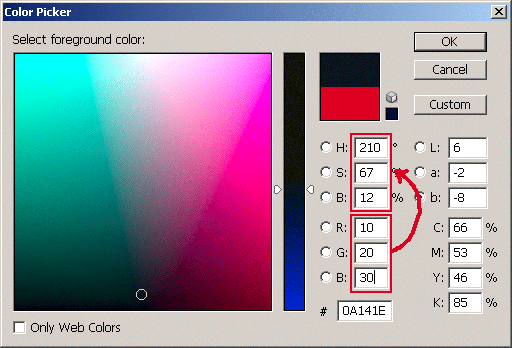
Source of the library
/**
*
*  Javascript color conversion
*  http://www.webtoolkit.info/
*
**/

function HSV(h, s, v) {
	if (h <= 0) { h = 0; }
	if (s <= 0) { s = 0; }
	if (v <= 0) { v = 0; }

	if (h > 360) { h = 360; }
	if (s > 100) { s = 100; }
	if (v > 100) { v = 100; }

	this.h = h;
	this.s = s;
	this.v = v;
}

function RGB(r, g, b) {
	if (r <= 0) { r = 0; }
	if (g <= 0) { g = 0; }
	if (b <= 0) { b = 0; }

	if (r > 255) { r = 255; }
	if (g > 255) { g = 255; }
	if (b > 255) { b = 255; }

	this.r = r;
	this.g = g;
	this.b = b;
}

function CMYK(c, m, y, k) {
	if (c <= 0) { c = 0; }
	if (m <= 0) { m = 0; }
	if (y <= 0) { y = 0; }
	if (k <= 0) { k = 0; }

	if (c > 100) { c = 100; }
	if (m > 100) { m = 100; }
	if (y > 100) { y = 100; }
	if (k > 100) { k = 100; }

	this.c = c;
	this.m = m;
	this.y = y;
	this.k = k;
}

var ColorConverter = {

	_RGBtoHSV : function  (RGB) {
		var result = new HSV(0, 0, 0);

		r = RGB.r / 255;
		g = RGB.g / 255;
		b = RGB.b / 255;

		var minVal = Math.min(r, g, b);
		var maxVal = Math.max(r, g, b);
		var delta = maxVal - minVal;

		result.v = maxVal;

		if (delta == 0) {
			result.h = 0;
			result.s = 0;
		} else {
			result.s = delta / maxVal;
			var del_R = (((maxVal - r) / 6) + (delta / 2)) / delta;
			var del_G = (((maxVal - g) / 6) + (delta / 2)) / delta;
			var del_B = (((maxVal - b) / 6) + (delta / 2)) / delta;

			if (r == maxVal) { result.h = del_B - del_G; }
			else if (g == maxVal) { result.h = (1 / 3) + del_R - del_B; }
			else if (b == maxVal) { result.h = (2 / 3) + del_G - del_R; }

			if (result.h < 0) { result.h += 1; }
			if (result.h > 1) { result.h -= 1; }
		}

		result.h = Math.round(result.h * 360);
		result.s = Math.round(result.s * 100);
		result.v = Math.round(result.v * 100);

		return result;
	},

	_HSVtoRGB : function  (HSV) {
		var result = new RGB(0, 0, 0);

		var h = HSV.h / 360;
		var s = HSV.s / 100;
		var v = HSV.v / 100;

		if (s == 0) {
			result.r = v * 255;
			result.g = v * 255;
			result.v = v * 255;
		} else {
			var_h = h * 6;
			var_i = Math.floor(var_h);
			var_1 = v * (1 - s);
			var_2 = v * (1 - s * (var_h - var_i));
			var_3 = v * (1 - s * (1 - (var_h - var_i)));

			if (var_i == 0) {var_r = v; var_g = var_3; var_b = var_1}
			else if (var_i == 1) {var_r = var_2; var_g = v; var_b = var_1}
			else if (var_i == 2) {var_r = var_1; var_g = v; var_b = var_3}
			else if (var_i == 3) {var_r = var_1; var_g = var_2; var_b = v}
			else if (var_i == 4) {var_r = var_3; var_g = var_1; var_b = v}
			else {var_r = v; var_g = var_1; var_b = var_2};

			result.r = var_r * 255;
			result.g = var_g * 255;
			result.b = var_b * 255;

			result.r = Math.round(result.r);
			result.g = Math.round(result.g);
			result.b = Math.round(result.b);
		}

		return result;
	},

	_CMYKtoRGB : function (CMYK){
		var result = new RGB(0, 0, 0);

		c = CMYK.c / 100;
		m = CMYK.m / 100;
		y = CMYK.y / 100;
		k = CMYK.k / 100;

		result.r = 1 - Math.min( 1, c * ( 1 - k ) + k );
		result.g = 1 - Math.min( 1, m * ( 1 - k ) + k );
		result.b = 1 - Math.min( 1, y * ( 1 - k ) + k );

		result.r = Math.round( result.r * 255 );
		result.g = Math.round( result.g * 255 );
		result.b = Math.round( result.b * 255 );

		return result;
	},

	_RGBtoCMYK : function (RGB){
		var result = new CMYK(0, 0, 0, 0);

		r = RGB.r / 255;
		g = RGB.g / 255;
		b = RGB.b / 255;

		result.k = Math.min( 1 - r, 1 - g, 1 - b );
		result.c = ( 1 - r - result.k ) / ( 1 - result.k );
		result.m = ( 1 - g - result.k ) / ( 1 - result.k );
		result.y = ( 1 - b - result.k ) / ( 1 - result.k );

		result.c = Math.round( result.c * 100 );
		result.m = Math.round( result.m * 100 );
		result.y = Math.round( result.y * 100 );
		result.k = Math.round( result.k * 100 );

		return result;
	},

	toRGB : function (o) {
		if (o instanceof RGB) { return o; }
		if (o instanceof HSV) {	return this._HSVtoRGB(o); }
		if (o instanceof CMYK) { return this._CMYKtoRGB(o); }
	},

	toHSV : function (o) {
		if (o instanceof HSV) { return o; }
		if (o instanceof RGB) { return this._RGBtoHSV(o); }
		if (o instanceof CMYK) { return this._RGBtoHSV(this._CMYKtoRGB(o)); }
	},

	toCMYK : function (o) {
		if (o instanceof CMYK) { return o; }
		if (o instanceof RGB) { return this._RGBtoCMYK(o); }
		if (o instanceof HSV) { return this._RGBtoCMYK(this._HSVtoRGB(o)); }
	}

}
The post Javascript color conversion appeared first on webtoolkit.info.
]]>The post Javascript open popup window appeared first on webtoolkit.info.
]]>You can use this function like this:
<a href="/index.html" title="Free code and tutorials"
onclick="return openWindow(this, {width:790,height:450,center:true})"
Free code and tutorials</a>
There are some available optional parameters which are passed as a second object parameter to this Javascript open window function (look above):
- width
- height
- left
- top
- center
- name
- scrollbars
- menubar
- locationbar
- resizable
Source code for webtookit.openwindow.js
/**
*
*  Javascript open window
*  http://www.webtoolkit.info/
*
**/

function openWindow(anchor, options) {

	var args = '';

	if (typeof(options) == 'undefined') { var options = new Object(); }
	if (typeof(options.name) == 'undefined') { options.name = 'win' + Math.round(Math.random()*100000); }

	if (typeof(options.height) != 'undefined' && typeof(options.fullscreen) == 'undefined') {
		args += "height=" + options.height + ",";
	}

	if (typeof(options.width) != 'undefined' && typeof(options.fullscreen) == 'undefined') {
		args += "width=" + options.width + ",";
	}

	if (typeof(options.fullscreen) != 'undefined') {
		args += "width=" + screen.availWidth + ",";
		args += "height=" + screen.availHeight + ",";
	}

	if (typeof(options.center) == 'undefined') {
		options.x = 0;
		options.y = 0;
		args += "screenx=" + options.x + ",";
		args += "screeny=" + options.y + ",";
		args += "left=" + options.x + ",";
		args += "top=" + options.y + ",";
	}

	if (typeof(options.center) != 'undefined' && typeof(options.fullscreen) == 'undefined') {
		options.y=Math.floor((screen.availHeight-(options.height || screen.height))/2)-(screen.height-screen.availHeight);
		options.x=Math.floor((screen.availWidth-(options.width || screen.width))/2)-(screen.width-screen.availWidth);
		args += "screenx=" + options.x + ",";
		args += "screeny=" + options.y + ",";
		args += "left=" + options.x + ",";
		args += "top=" + options.y + ",";
	}

	if (typeof(options.scrollbars) != 'undefined') { args += "scrollbars=1,"; }
	if (typeof(options.menubar) != 'undefined') { args += "menubar=1,"; }
	if (typeof(options.locationbar) != 'undefined') { args += "location=1,"; }
	if (typeof(options.resizable) != 'undefined') { args += "resizable=1,"; }

	var win = window.open(anchor, options.name, args);
	return false;

}
The post Javascript open popup window appeared first on webtoolkit.info.
]]>The post Javascript replace appeared first on webtoolkit.info.
]]>Source code for webtoolkit.strreplace.js
/**
*
*  Javascript string replace
*  http://www.webtoolkit.info/
*
**/

// standart string replace functionality
function str_replace(haystack, needle, replacement) {
	var temp = haystack.split(needle);
	return temp.join(replacement);
}

// needle may be a regular expression
function str_replace_reg(haystack, needle, replacement) {
	var r = new RegExp(needle, 'g');
	return haystack.replace(r, replacement);
}
The post Javascript replace appeared first on webtoolkit.info.
]]>The post Sortable table appeared first on webtoolkit.info.
]]>Tested in IE5.0+, OP8.0+, FF1.0+
Source code for index.html
<!DOCTYPE html PUBLIC "-//W3C//DTD XHTML 1.0 Transitional//EN" "http://www.w3.org/TR/xhtml1/DTD/xhtml1-transitional.dtd">
<html xmlns="http://www.w3.org/1999/xhtml" xml:lang="en" lang="en">
<head>
	<title>Scrollable HTML table</title>
	<meta http-equiv="Content-type" content="text/html; charset=UTF-8" />
	<script type="text/javascript" src="/javascript/feed/webtoolkit.sortabletable.js"></script>

	<style>
		table {
			text-align: left;
			font-size: 12px;
			font-family: verdana;
			background: #c0c0c0;
		}

		table thead  {
			cursor: pointer;
		}

		table thead tr,
		table tfoot tr {
			background: #c0c0c0;
		}

		table tbody tr {
			background: #f0f0f0;
		}

		td, th {
			border: 1px solid white;
		}
	</style>
</head>

<body>

<table cellspacing="1" cellpadding="2" class="" id="myTable" width="400">
	<thead>
		<tr>
			<th class="c1">Name</th>
			<th class="c2">Surename</th>
			<th class="c3">Age</th>
		</tr>
	</thead>

	<tbody>
		<tr class="r1">
			<td class="c1">John</th>
			<td class="c2">Smith</th>
			<td class="c3">30</th>
		</tr>
		<tr class="r2">
			<td class="c1">John</th>
			<td class="c2">Smith</th>
			<td class="c3">31</th>
		</tr>
		<tr class="r1">
			<td class="c1">John</th>
			<td class="c2">Smith</th>
			<td class="c3">32</th>
		</tr>
		<tr class="r2">
			<td class="c1">John</th>
			<td class="c2">Smith</th>
			<td class="c3">33</th>
		</tr>
		<tr class="r1">
			<td class="c1">John</th>
			<td class="c2">Smith</th>
			<td class="c3">34</th>
		</tr>
		<tr class="r2">
			<td class="c1">John</th>
			<td class="c2">Smith</th>
			<td class="c3">35</th>
		</tr>
		<tr class="r1">
			<td class="c1">John</th>
			<td class="c2">Smith</th>
			<td class="c3">36</th>
		</tr>
		<tr class="r2">
			<td class="c1">John</th>
			<td class="c2">Smith</th>
			<td class="c3">37</th>
		</tr>
	</tbody>

	<tfoot>
		<tr>
			<th class="c1">Name</th>
			<th class="c2">Surename</th>
			<th class="c3">Age</th>
		</tr>
	</tfoot>
</table>

<script type="text/javascript">
var t = new SortableTable(document.getElementById('myTable'), 100);
</script>

</body>
</html>
Source code for webtoolkit.sortabletable.js
/**
*
*  Sortable HTML table
*  http://www.webtoolkit.info/
*
**/

function SortableTable (tableEl) {

	this.tbody = tableEl.getElementsByTagName('tbody');
	this.thead = tableEl.getElementsByTagName('thead');
	this.tfoot = tableEl.getElementsByTagName('tfoot');

	this.getInnerText = function (el) {
		if (typeof(el.textContent) != 'undefined') return el.textContent;
		if (typeof(el.innerText) != 'undefined') return el.innerText;
		if (typeof(el.innerHTML) == 'string') return el.innerHTML.replace(/<[^<>]+>/g,'');
	}

	this.getParent = function (el, pTagName) {
		if (el == null) return null;
		else if (el.nodeType == 1 && el.tagName.toLowerCase() == pTagName.toLowerCase())
			return el;
		else
			return this.getParent(el.parentNode, pTagName);
	}

	this.sort = function (cell) {

	    var column = cell.cellIndex;
	    var itm = this.getInnerText(this.tbody[0].rows[1].cells[column]);
		var sortfn = this.sortCaseInsensitive;

		if (itm.match(/\d\d[-]+\d\d[-]+\d\d\d\d/)) sortfn = this.sortDate; // date format mm-dd-yyyy
		if (itm.replace(/^\s+|\s+$/g,"").match(/^[\d\.]+$/)) sortfn = this.sortNumeric;

		this.sortColumnIndex = column;

	    var newRows = new Array();
	    for (j = 0; j < this.tbody[0].rows.length; j++) {
			newRows[j] = this.tbody[0].rows[j];
		}

		newRows.sort(sortfn);

		if (cell.getAttribute("sortdir") == 'down') {
			newRows.reverse();
			cell.setAttribute('sortdir','up');
		} else {
			cell.setAttribute('sortdir','down');
		}

		for (i=0;i<newRows.length;i++) {
			this.tbody[0].appendChild(newRows[i]);
		}

	}

	this.sortCaseInsensitive = function(a,b) {
		aa = thisObject.getInnerText(a.cells[thisObject.sortColumnIndex]).toLowerCase();
		bb = thisObject.getInnerText(b.cells[thisObject.sortColumnIndex]).toLowerCase();
		if (aa==bb) return 0;
		if (aa<bb) return -1;
		return 1;
	}

	this.sortDate = function(a,b) {
		aa = thisObject.getInnerText(a.cells[thisObject.sortColumnIndex]);
		bb = thisObject.getInnerText(b.cells[thisObject.sortColumnIndex]);
		date1 = aa.substr(6,4)+aa.substr(3,2)+aa.substr(0,2);
		date2 = bb.substr(6,4)+bb.substr(3,2)+bb.substr(0,2);
		if (date1==date2) return 0;
		if (date1<date2) return -1;
		return 1;
	}

	this.sortNumeric = function(a,b) {
		aa = parseFloat(thisObject.getInnerText(a.cells[thisObject.sortColumnIndex]));
		if (isNaN(aa)) aa = 0;
		bb = parseFloat(thisObject.getInnerText(b.cells[thisObject.sortColumnIndex]));
		if (isNaN(bb)) bb = 0;
		return aa-bb;
	}

	// define variables
	var thisObject = this;
	var sortSection = this.thead;

	// constructor actions
	if (!(this.tbody && this.tbody[0].rows && this.tbody[0].rows.length > 0)) return;

	if (sortSection && sortSection[0].rows && sortSection[0].rows.length > 0) {
		var sortRow = sortSection[0].rows[0];
	} else {
		return;
	}

	for (var i=0; i<sortRow.cells.length; i++) {
		sortRow.cells[i].sTable = this;
		sortRow.cells[i].onclick = function () {
			this.sTable.sort(this);
			return false;
		}
	}

}
The post Sortable table appeared first on webtoolkit.info.
]]>The post Javascript trim appeared first on webtoolkit.info.
]]>This Javascript code trim implementation removes all leading and trailing occurrences of a set of characters specified. If no characters are specified it will trim whitespace characters from the beginning or end or both of the string.
Without the second parameter, Javascript function will trim these characters:
- ” ” (ASCII 32 (0×20)), an ordinary space.
- “\t” (ASCII 9 (0×09)), a tab.
- “\n” (ASCII 10 (0x0A)), a new line (line feed).
- “\r” (ASCII 13 (0x0D)), a carriage return.
- “\0″ (ASCII 0 (0×00)), the NUL-byte.
- “\x0B” (ASCII 11 (0x0B)), a vertical tab.
Source code for webtoolkit.trim.js
/**
*
*  Javascript trim, ltrim, rtrim
*  http://www.webtoolkit.info/
*
**/

function trim(str, chars) {
	return ltrim(rtrim(str, chars), chars);
}

function ltrim(str, chars) {
	chars = chars || "\\s";
	return str.replace(new RegExp("^[" + chars + "]+", "g"), "");
}

function rtrim(str, chars) {
	chars = chars || "\\s";
	return str.replace(new RegExp("[" + chars + "]+$", "g"), "");
}
The post Javascript trim appeared first on webtoolkit.info.
]]>The post Javascript context menu appeared first on webtoolkit.info.
]]>Include the script and the style sheet at the top of your code (you can find the code in the source code section of this page). Do it in tag. After loading the script you can write your code to attach context menu.
Javascript context menu code tested in IE5.5+, FF1.0+.
Source code for index.html
<!DOCTYPE html PUBLIC "-//W3C//DTD XHTML 1.0 Strict//EN" "http://www.w3.org/TR/xhtml1/DTD/xhtml1-strict.dtd">
<html xmlns="http://www.w3.org/1999/xhtml" xml:lang="en">
<head>
	<title>My project</title>
	<meta http-equiv="Content-Type" content="text/html; charset=UTF-8" />
	<link type="text/css" rel="stylesheet" href="/javascript/feed/webtoolkit.contextmenu.css" />
	<script type="text/javascript" src="/javascript/feed/webtoolkit.contextmenu.js"></script>
	<script type="text/javascript">
		SimpleContextMenu.setup({'preventDefault':true, 'preventForms':false});
		SimpleContextMenu.attach('container', 'CM1');
	</script>
</head>
<body>
	<ul id="CM1" class="SimpleContextMenu">
		<li><a href="#">Item 1</a></li>
		<li><a href="#">Item 2</a></li>
		<li><a href="#">Item 3</a></li>
		<li><a href="#">Item 4</a></li>
	</ul>

	<input type="text" name="field" value="" />
	<div class="container">Cointainer1</div>
	<div class="container">Cointainer2</div>
	<div class="container">Cointainer3</div>
</body>
</html>
Source code for webtoolkit.contextmenu.css
ul.SimpleContextMenu {
	display: none;
	position: absolute;
	margin: 0px;
	padding: 0px;
	font-family: verdana;
	font-size: 12px;
	list-style-type: none;
	border-top: 1px solid #000000;
	border-left: 1px solid #000000;
	border-right: 1px solid #000000;
}

	ul.SimpleContextMenu li {
		border-bottom: 1px solid #000000;
	}

		ul.SimpleContextMenu li a {
			display: block;
			width: 100px;
			padding: 2px 10px 3px 10px;
			text-decoration: none;
			color: #ff0000;
			background: #eeeeee;
		}

		ul.SimpleContextMenu li a:hover {
			text-decoration: none;
			color: #ffffff;
			background: #ff0000;
		}
Source code for webtoolkit.contextmenu.js
/**
*
*  Simple Context Menu
*  http://www.webtoolkit.info/
*
**/

var SimpleContextMenu = {

	// private attributes
	_menus : new Array,
	_attachedElement : null,
	_menuElement : null,
	_preventDefault : true,
	_preventForms : true,


	// public method. Sets up whole context menu stuff..
	setup : function (conf) {

		if ( document.all && document.getElementById && !window.opera ) {
			SimpleContextMenu.IE = true;
		}

		if ( !document.all && document.getElementById && !window.opera ) {
			SimpleContextMenu.FF = true;
		}

		if ( document.all && document.getElementById && window.opera ) {
			SimpleContextMenu.OP = true;
		}

		if ( SimpleContextMenu.IE || SimpleContextMenu.FF ) {

			document.oncontextmenu = SimpleContextMenu._show;
			document.onclick = SimpleContextMenu._hide;

			if (conf && typeof(conf.preventDefault) != "undefined") {
				SimpleContextMenu._preventDefault = conf.preventDefault;
			}

			if (conf && typeof(conf.preventForms) != "undefined") {
				SimpleContextMenu._preventForms = conf.preventForms;
			}

		}

	},


	// public method. Attaches context menus to specific class names
	attach : function (classNames, menuId) {

		if (typeof(classNames) == "string") {
			SimpleContextMenu._menus[classNames] = menuId;
		}

		if (typeof(classNames) == "object") {
			for (x = 0; x < classNames.length; x++) {
				SimpleContextMenu._menus[classNames[x]] = menuId;
			}
		}

	},


	// private method. Get which context menu to show
	_getMenuElementId : function (e) {

		if (SimpleContextMenu.IE) {
			SimpleContextMenu._attachedElement = event.srcElement;
		} else {
			SimpleContextMenu._attachedElement = e.target;
		}

		while(SimpleContextMenu._attachedElement != null) {
			var className = SimpleContextMenu._attachedElement.className;

			if (typeof(className) != "undefined") {
				className = className.replace(/^\s+/g, "").replace(/\s+$/g, "")
				var classArray = className.split(/[ ]+/g);

				for (i = 0; i < classArray.length; i++) {
					if (SimpleContextMenu._menus[classArray[i]]) {
						return SimpleContextMenu._menus[classArray[i]];
					}
				}
			}

			if (SimpleContextMenu.IE) {
				SimpleContextMenu._attachedElement = SimpleContextMenu._attachedElement.parentElement;
			} else {
				SimpleContextMenu._attachedElement = SimpleContextMenu._attachedElement.parentNode;
			}
		}

		return null;

	},


	// private method. Shows context menu
	_getReturnValue : function (e) {

		var returnValue = true;
		var evt = SimpleContextMenu.IE ? window.event : e;

		if (evt.button != 1) {
			if (evt.target) {
				var el = evt.target;
			} else if (evt.srcElement) {
				var el = evt.srcElement;
			}

			var tname = el.tagName.toLowerCase();

			if ((tname == "input" || tname == "textarea")) {
				if (!SimpleContextMenu._preventForms) {
					returnValue = true;
				} else {
					returnValue = false;
				}
			} else {
				if (!SimpleContextMenu._preventDefault) {
					returnValue = true;
				} else {
					returnValue = false;
				}
			}
		}

		return returnValue;

	},


	// private method. Shows context menu
	_show : function (e) {

		SimpleContextMenu._hide();
		var menuElementId = SimpleContextMenu._getMenuElementId(e);

		if (menuElementId) {
			var m = SimpleContextMenu._getMousePosition(e);
			var s = SimpleContextMenu._getScrollPosition(e);

			SimpleContextMenu._menuElement = document.getElementById(menuElementId);
			SimpleContextMenu._menuElement.style.left = m.x + s.x + 'px';
			SimpleContextMenu._menuElement.style.top = m.y + s.y + 'px';
			SimpleContextMenu._menuElement.style.display = 'block';
			return false;
		}

		return SimpleContextMenu._getReturnValue(e);

	},


	// private method. Hides context menu
	_hide : function () {

		if (SimpleContextMenu._menuElement) {
			SimpleContextMenu._menuElement.style.display = 'none';
		}

	},


	// private method. Returns mouse position
	_getMousePosition : function (e) {

		e = e ? e : window.event;
		var position = {
			'x' : e.clientX,
			'y' : e.clientY
		}

		return position;

	},


	// private method. Get document scroll position
	_getScrollPosition : function () {

		var x = 0;
		var y = 0;

		if( typeof( window.pageYOffset ) == 'number' ) {
			x = window.pageXOffset;
			y = window.pageYOffset;
		} else if( document.documentElement && ( document.documentElement.scrollLeft || document.documentElement.scrollTop ) ) {
			x = document.documentElement.scrollLeft;
			y = document.documentElement.scrollTop;
		} else if( document.body && ( document.body.scrollLeft || document.body.scrollTop ) ) {
			x = document.body.scrollLeft;
			y = document.body.scrollTop;
		}

		var position = {
			'x' : x,
			'y' : y
		}

		return position;

	}

}
The post Javascript context menu appeared first on webtoolkit.info.
]]>The post Javascript image preload appeared first on webtoolkit.info.
]]>You can supply one image url as an argument to this function, or an array of image urls.
Source code for webtoolkit.imagepreload.js
/**
*
*  Image preload
*  http://www.webtoolkit.info/
*
**/

function ImagePreload() {
	if (typeof(arguments) != 'undefined') {
		for (i=0; i<arguments.length; i++ ) {
			if (typeof(arguments[i]) == "object") {
				for (k=0; k<arguments[i].length; k++) {
					var oImage = new Image;
					oImage.src = arguments[i][k];
				}
			}

			if (typeof(arguments[i]) == "string") {
				var oImage = new Image;
				oImage.src = arguments[i];
			}
		}
	}
}
The post Javascript image preload appeared first on webtoolkit.info.
]]>The post Javascript unselectable text appeared first on webtoolkit.info.
]]>Source code for webtoolkit.unselectable.js
/**
*
*  Unselectable text
*  http://www.webtoolkit.info/
*
**/

var Unselectable = {

	enable : function(e) {
		var e = e ? e : window.event;

		if (e.button != 1) {
			if (e.target) {
				var targer = e.target;
			} else if (e.srcElement) {
				var targer = e.srcElement;
			}

			var targetTag = targer.tagName.toLowerCase();
			if ((targetTag != "input") && (targetTag != "textarea")) {
				return false;
			}
		}
	},

	disable : function () {
		return true;
	}

}

if (typeof(document.onselectstart) != "undefined") {
	document.onselectstart = Unselectable.enable;
} else {
	document.onmousedown = Unselectable.enable;
	document.onmouseup = Unselectable.disable;
}
The post Javascript unselectable text appeared first on webtoolkit.info.
]]>The post Javascript drag and drop appeared first on webtoolkit.info.
]]>First include the script at the top of your code (you can find the code in the source code section of this page). Do it in tag. After loading the script you can write your code to attach drag handler.
You can attach this drag handler to any number of elements on page and you will be able to drag them all. The most importaint thing is that these elements must be posisioned relatively or absolutely.
DEMO
Source code for webtoolkit.drag.js
/**
*
*  Crossbrowser Drag Handler
*  http://www.webtoolkit.info/
*
**/

var DragHandler = {


	// private property.
	_oElem : null,


	// public method. Attach drag handler to an element.
	attach : function(oElem) {
		oElem.onmousedown = DragHandler._dragBegin;

		// callbacks
		oElem.dragBegin = new Function();
		oElem.drag = new Function();
		oElem.dragEnd = new Function();

		return oElem;
	},


	// private method. Begin drag process.
	_dragBegin : function(e) {
		var oElem = DragHandler._oElem = this;

		if (isNaN(parseInt(oElem.style.left))) { oElem.style.left = '0px'; }
		if (isNaN(parseInt(oElem.style.top))) { oElem.style.top = '0px'; }

		var x = parseInt(oElem.style.left);
		var y = parseInt(oElem.style.top);

		e = e ? e : window.event;
		oElem.mouseX = e.clientX;
		oElem.mouseY = e.clientY;

		oElem.dragBegin(oElem, x, y);

		document.onmousemove = DragHandler._drag;
		document.onmouseup = DragHandler._dragEnd;
		return false;
	},


	// private method. Drag (move) element.
	_drag : function(e) {
		var oElem = DragHandler._oElem;

		var x = parseInt(oElem.style.left);
		var y = parseInt(oElem.style.top);

		e = e ? e : window.event;
		oElem.style.left = x + (e.clientX - oElem.mouseX) + 'px';
		oElem.style.top = y + (e.clientY - oElem.mouseY) + 'px';

		oElem.mouseX = e.clientX;
		oElem.mouseY = e.clientY;

		oElem.drag(oElem, x, y);

		return false;
	},


	// private method. Stop drag process.
	_dragEnd : function() {
		var oElem = DragHandler._oElem;

		var x = parseInt(oElem.style.left);
		var y = parseInt(oElem.style.top);

		oElem.dragEnd(oElem, x, y);

		document.onmousemove = null;
		document.onmouseup = null;
		DragHandler._oElem = null;
	}

}
The post Javascript drag and drop appeared first on webtoolkit.info.
]]>